Installing CMS using the autoinstaller

Go to cPanel -> Softaculous Apps Installer


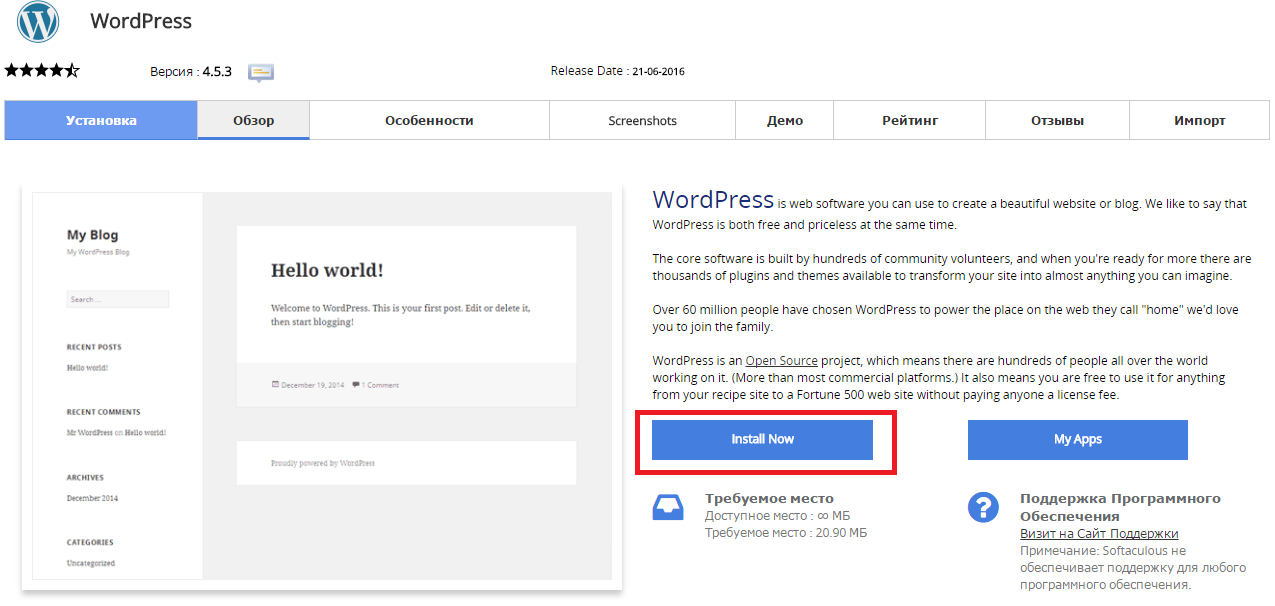
Press “Install Now” to install Wordpress

Снимок2.PNG

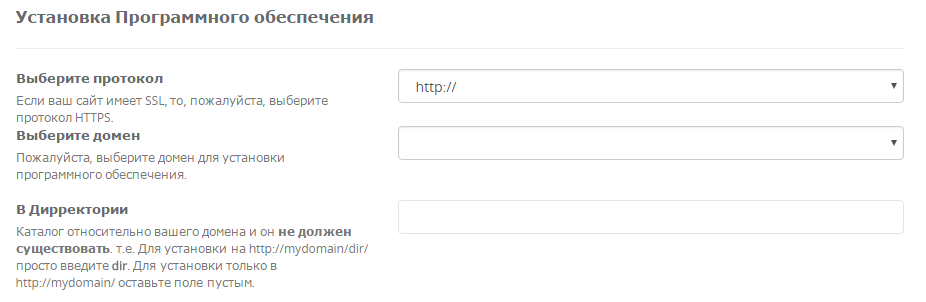
Fill in the folowing data

Снимок3.PNG

  • You should choose HTTP or HTTPS protocol.

  • Choose the domain to install the software.

  • Enter a directory where the Wordpress will be installed. You shouldn't create the derictory before CMS installation. To install only in http://mydomain/ leave this empty.


In the following field you should enter Site Name and Site Description. These data can be changed after installation. Снимок4.PNG


War diese Antwort hilfreich?

 Artikel drucken

Lesen Sie auch

Wie bearbeite ich eine Datei über den cPanel Dateimanager?

Um Dateien zu ändern, öffnen Sie den Manager in dem cPanel, im Bereich “Dateien”, “Dateimanager”....

Welche Kanal-Bandbreite hat der WebHosting Server?

Die Kanal-Bandbreite auf dem Server ist 1 Gb/s

Inode Usage

An inode is a data structure used to keep information about a file on your hosting account. The...

How Do I Add DKIM Records to my DNS?

Go to cPanel to Email section, click Authenticanion link. If the DKM is enabled but DNS record...

How to Change your Email Password

Login to cPanel and click on the Email Accounts icon located in the MAIL section.   From the...