Installing CMS using the autoinstaller

Go to cPanel -> Softaculous Apps Installer


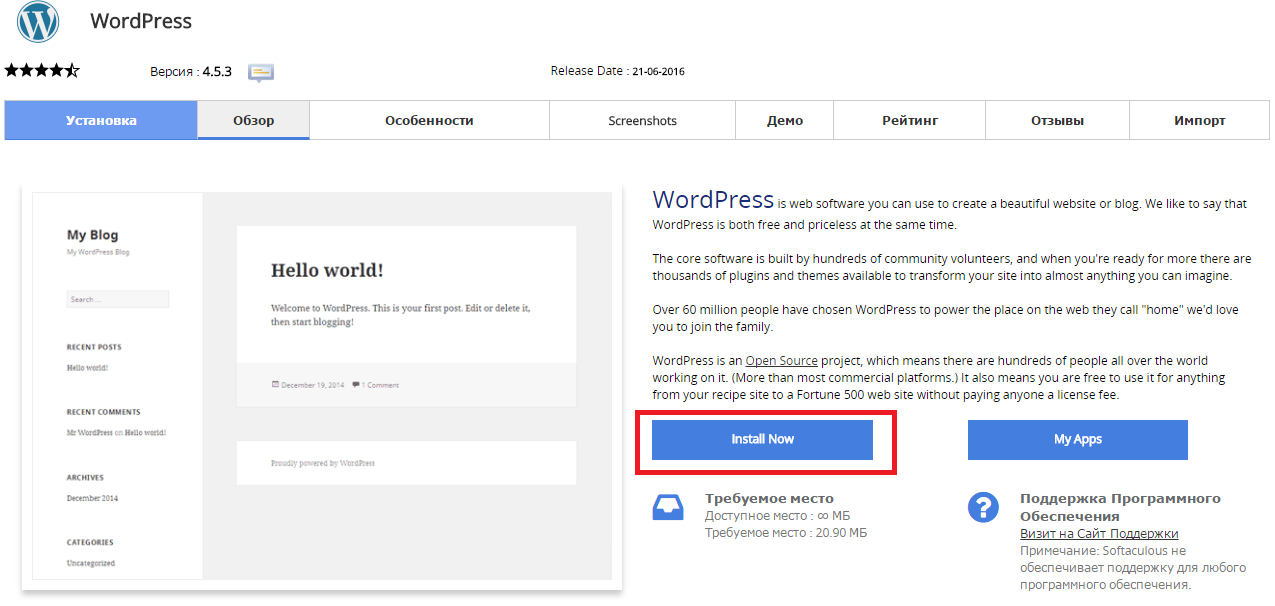
Press “Install Now” to install Wordpress

Снимок2.PNG

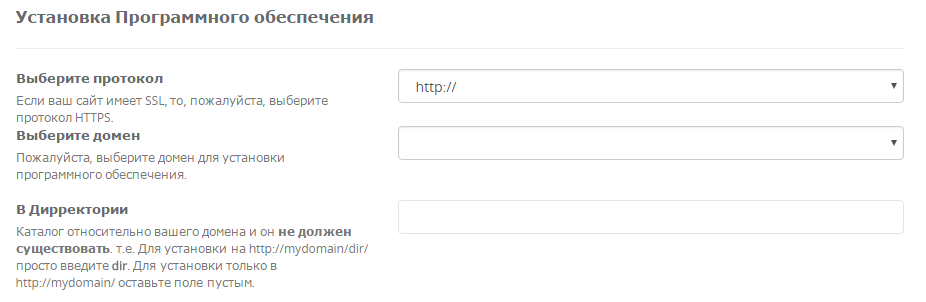
Fill in the folowing data

Снимок3.PNG

  • You should choose HTTP or HTTPS protocol.

  • Choose the domain to install the software.

  • Enter a directory where the Wordpress will be installed. You shouldn't create the derictory before CMS installation. To install only in http://mydomain/ leave this empty.


In the following field you should enter Site Name and Site Description. These data can be changed after installation. Снимок4.PNG


¿Fue útil la respuesta?

 Imprimir éste Artículo

Leer también

He cambiado los servidores DNS hace una hora, pero todavía no hay cambios.

Debes esperar 12 - 48 horas hasta que los cambios sean efectivoos. No hay manera de acelerarlo.

¿Cómo crear una cuenta de FTP?

Con tu cuenta de hosting se crea uUna cuenta FTP principal de forma automática con acceso a todas...

How to Change PHP Version in cPanel

1. Log into cPanel. Click the Select PHP Version button in the Software section 2. Select the...

¿Dónde cambiar los permisos de carpetas y archivos?

Los permisos se pueden cambiar en el cPanel - "Administrador de archivos" - selecciona los...

How Do I Add DKIM Records to my DNS?

Go to cPanel to Email section, click Authenticanion link. If the DKM is enabled but DNS record...