How Can I Edit php.ini Using SSH (putty)?

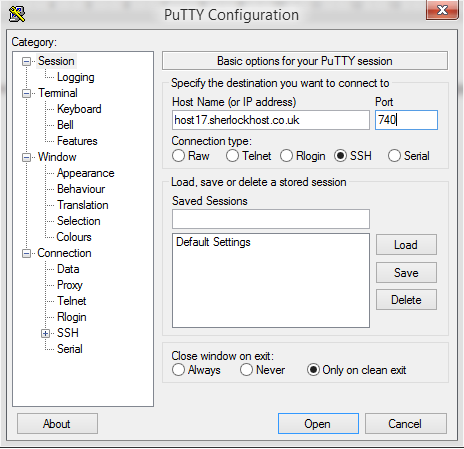
Connect to the server using SSH. launch Putty. For example, Host Name: host17.sherlockhost.co.uk, port 740

ssh1.PNG

Use keyboard shortcut shift+insert to enter login and password

ssh5.PNG

Add a comand to edit php.ini version 

PHP version

Comand

PHP  5.2

nano /etc/cl.php.d/alt-php52/alt_php.ini

PHP  5.3

nano /etc/cl.php.d/alt-php53/alt_php.ini

PHP  5.4

nano /etc/cl.php.d/alt-php54/alt_php.ini

PHP  5.5

nano /etc/cl.php.d/alt-php55/alt_php.ini

PHP  5.6

nano /etc/cl.php.d/alt-php56/alt_php.ini

PHP  7.0

nano /etc/cl.php.d/alt-php70/alt_php.ini


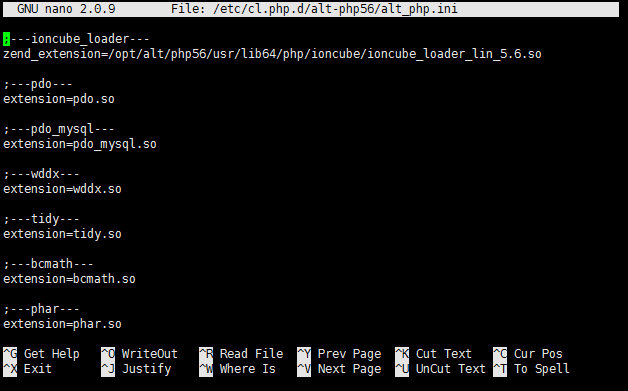
Insert the comand and you'll see the following window:


All changes are to be entered in the end of the file. Press F2 to save changes, then press Y. To end the prosedure press Ctrl+X and close the window.
آیا این پاسخ به شما کمک کرد؟

 پرینت این مقاله

در همین زمینه

I have registered for your hosting and have my own domain name. What do I need to do now?

You should transfer your domain name to our DNS servers: ns1.sherlockhost.co.uk,...

I changed my DNS server an hour ago but nothing has happened.

It takes from 12 - 48 hours for this to be done, you have to be patient.

Change Upload/Download File Size

1. Log into cPanel. Click the Select PHP Version button in the Software section  2. Press...

Information concerning an SSH connection

If you have an account with cPanel control panel, please add your keys to it and authorize. It...

What is .htaccess?

.htaccess  file is a configuration file supported by a number of web servers, used for...