How Can I Edit php.ini Using SSH (putty)?

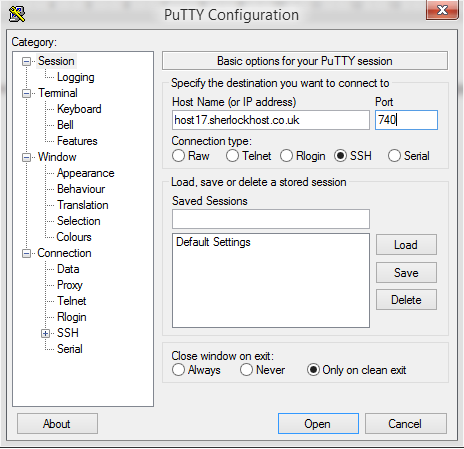
Connect to the server using SSH. launch Putty. For example, Host Name: host17.sherlockhost.co.uk, port 740

ssh1.PNG

Use keyboard shortcut shift+insert to enter login and password

ssh5.PNG

Add a comand to edit php.ini version 

PHP version

Comand

PHP  5.2

nano /etc/cl.php.d/alt-php52/alt_php.ini

PHP  5.3

nano /etc/cl.php.d/alt-php53/alt_php.ini

PHP  5.4

nano /etc/cl.php.d/alt-php54/alt_php.ini

PHP  5.5

nano /etc/cl.php.d/alt-php55/alt_php.ini

PHP  5.6

nano /etc/cl.php.d/alt-php56/alt_php.ini

PHP  7.0

nano /etc/cl.php.d/alt-php70/alt_php.ini


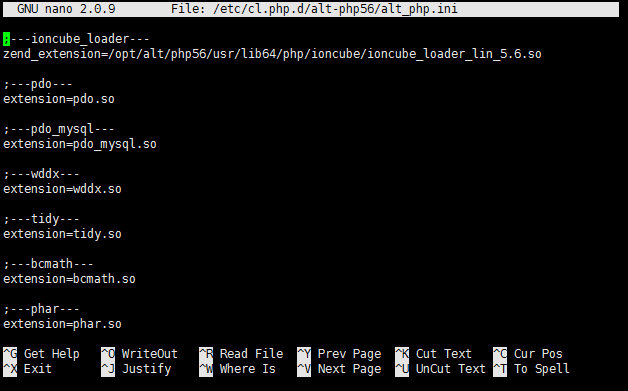
Insert the comand and you'll see the following window:


All changes are to be entered in the end of the file. Press F2 to save changes, then press Y. To end the prosedure press Ctrl+X and close the window.
Cette réponse était-elle pertinente?

 Imprimer cet article

Consultez aussi

Where can I change my cPanel password?

You can do that in the customer area, go to "Services" - "My services" - "View details" - "Change...

Installation Composer Instruction

1. To install Composer log in to your account via SSH.Use the command echo 'alias composer="php...

How to Access Email Accounts Through Any Web Browser

First, you need to login to cPanel and click on the Email Accounts icon located in the MAIL...

Change Upload/Download File Size

1. Log into cPanel. Click the Select PHP Version button in the Software section  2. Press...

How to Change memory_limit

1. Log into cPanel. Click the Select PHP Version button in the Software section 2. Press Switch...