How Can I Edit php.ini Using SSH (putty)?

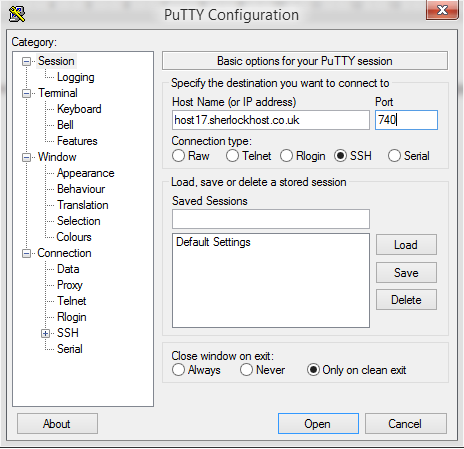
Connect to the server using SSH. launch Putty. For example, Host Name: host17.sherlockhost.co.uk, port 740

ssh1.PNG

Use keyboard shortcut shift+insert to enter login and password

ssh5.PNG

Add a comand to edit php.ini version 

PHP version

Comand

PHP  5.2

nano /etc/cl.php.d/alt-php52/alt_php.ini

PHP  5.3

nano /etc/cl.php.d/alt-php53/alt_php.ini

PHP  5.4

nano /etc/cl.php.d/alt-php54/alt_php.ini

PHP  5.5

nano /etc/cl.php.d/alt-php55/alt_php.ini

PHP  5.6

nano /etc/cl.php.d/alt-php56/alt_php.ini

PHP  7.0

nano /etc/cl.php.d/alt-php70/alt_php.ini


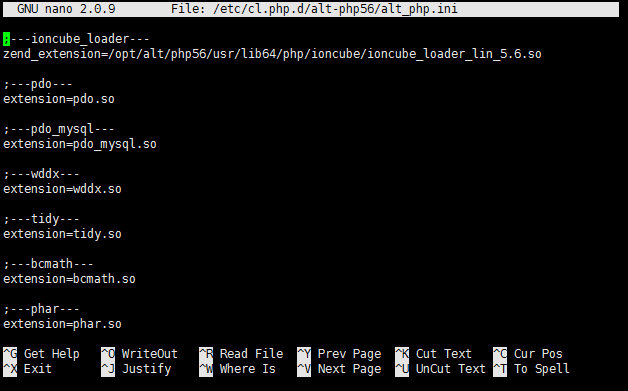
Insert the comand and you'll see the following window:


All changes are to be entered in the end of the file. Press F2 to save changes, then press Y. To end the prosedure press Ctrl+X and close the window.
Hasznosnak találta ezt a választ?

 Kinyomtatja ezt a cikket

Ezenkívül olvassa el

Installing CMS using the autoinstaller

Go to cPanel -> Softaculous Apps Installer    Press “Install Now” to install Wordpress...

How to Upload a Website Content with cPanel?

1. Go to the "Files" block, click on the "File manager" icon. Choose the "public_html/www"...

Installation Composer Instruction

1. To install Composer log in to your account via SSH.Use the command echo 'alias composer="php...

How to Create Email Accounts in cPanel

First, you need to login to cPanel and click on the Email Accounts icon located in the MAIL...

Settings for the database connection

  Server, username and password are given in the email "New Account Information".  DB_NAME - is...