How Can I Edit php.ini Using SSH (putty)?

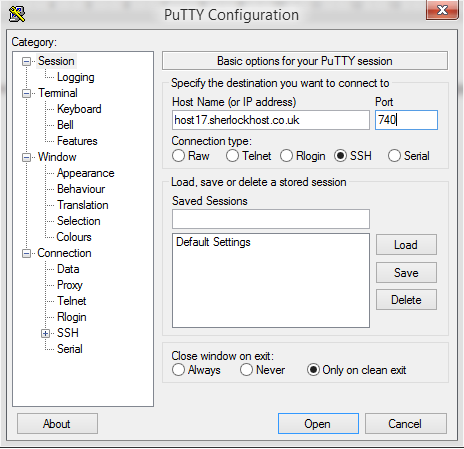
Connect to the server using SSH. launch Putty. For example, Host Name: host17.sherlockhost.co.uk, port 740

ssh1.PNG

Use keyboard shortcut shift+insert to enter login and password

ssh5.PNG

Add a comand to edit php.ini version 

PHP version

Comand

PHP  5.2

nano /etc/cl.php.d/alt-php52/alt_php.ini

PHP  5.3

nano /etc/cl.php.d/alt-php53/alt_php.ini

PHP  5.4

nano /etc/cl.php.d/alt-php54/alt_php.ini

PHP  5.5

nano /etc/cl.php.d/alt-php55/alt_php.ini

PHP  5.6

nano /etc/cl.php.d/alt-php56/alt_php.ini

PHP  7.0

nano /etc/cl.php.d/alt-php70/alt_php.ini


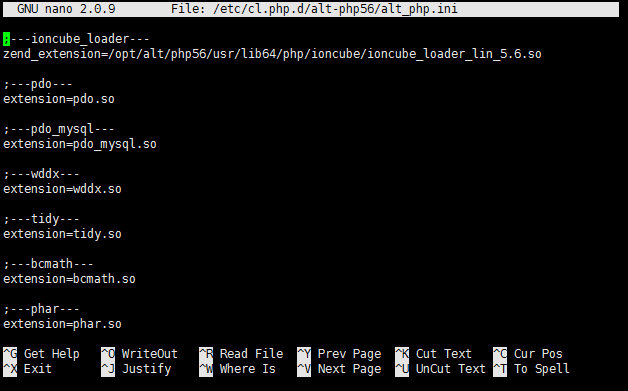
Insert the comand and you'll see the following window:


All changes are to be entered in the end of the file. Press F2 to save changes, then press Y. To end the prosedure press Ctrl+X and close the window.
Czy ta odpowiedź była pomocna?

 Wydrukuj ten artykuł

Przeczytaj także

How can I create an FTP-account?

When you buy hosting from us this includes one main FTP account that has access to all hosting...

How to Order Dedicated IP and SSL Certificate

SSL Certificates provide a secure encrypted connection between a browser and a server. The SSL...

Easy Ways To Speed Up WordPress

At first be sure that you’re not running plugins, that you don’t need and which may make your...

How to Change PHP Version in cPanel

1. Log into cPanel. Click the Select PHP Version button in the Software section 2. Select the...

Installation Composer Instruction

1. To install Composer log in to your account via SSH.Use the command echo 'alias composer="php...