How Can I Edit php.ini Using SSH (putty)?

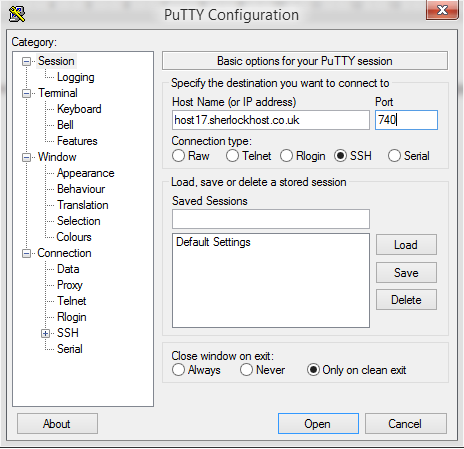
Connect to the server using SSH. launch Putty. For example, Host Name: host17.sherlockhost.co.uk, port 740

ssh1.PNG

Use keyboard shortcut shift+insert to enter login and password

ssh5.PNG

Add a comand to edit php.ini version 

PHP version

Comand

PHP  5.2

nano /etc/cl.php.d/alt-php52/alt_php.ini

PHP  5.3

nano /etc/cl.php.d/alt-php53/alt_php.ini

PHP  5.4

nano /etc/cl.php.d/alt-php54/alt_php.ini

PHP  5.5

nano /etc/cl.php.d/alt-php55/alt_php.ini

PHP  5.6

nano /etc/cl.php.d/alt-php56/alt_php.ini

PHP  7.0

nano /etc/cl.php.d/alt-php70/alt_php.ini


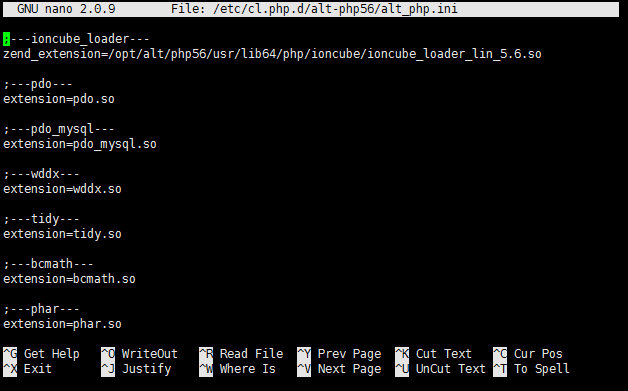
Insert the comand and you'll see the following window:


All changes are to be entered in the end of the file. Press F2 to save changes, then press Y. To end the prosedure press Ctrl+X and close the window.
Esta resposta lhe foi útil?

 Imprimir este Artigo

Veja também

Inode Usage

An inode is a data structure used to keep information about a file on your hosting account. The...

Where can I change files or folders permissions?

Permissions can be changed at cPanel - "File Manager" - select files/folder - click "Change...

How to Change PHP Version in cPanel

1. Log into cPanel. Click the Select PHP Version button in the Software section 2. Select the...

How to Change your Email Password

Login to cPanel and click on the Email Accounts icon located in the MAIL section.   From the...

Where can I change my cPanel password?

You can do that in the customer area, go to "Services" - "My services" - "View details" - "Change...