How Can I Edit php.ini Using SSH (putty)?

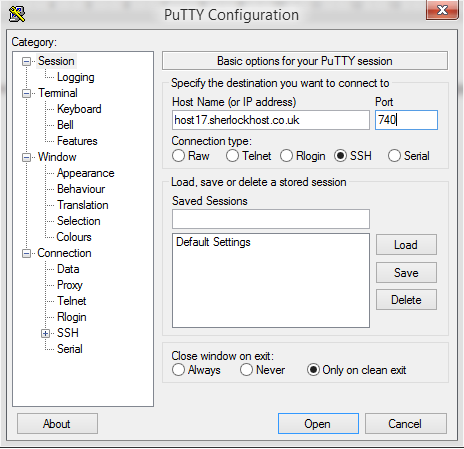
Connect to the server using SSH. launch Putty. For example, Host Name: host17.sherlockhost.co.uk, port 740

ssh1.PNG

Use keyboard shortcut shift+insert to enter login and password

ssh5.PNG

Add a comand to edit php.ini version 

PHP version

Comand

PHP  5.2

nano /etc/cl.php.d/alt-php52/alt_php.ini

PHP  5.3

nano /etc/cl.php.d/alt-php53/alt_php.ini

PHP  5.4

nano /etc/cl.php.d/alt-php54/alt_php.ini

PHP  5.5

nano /etc/cl.php.d/alt-php55/alt_php.ini

PHP  5.6

nano /etc/cl.php.d/alt-php56/alt_php.ini

PHP  7.0

nano /etc/cl.php.d/alt-php70/alt_php.ini


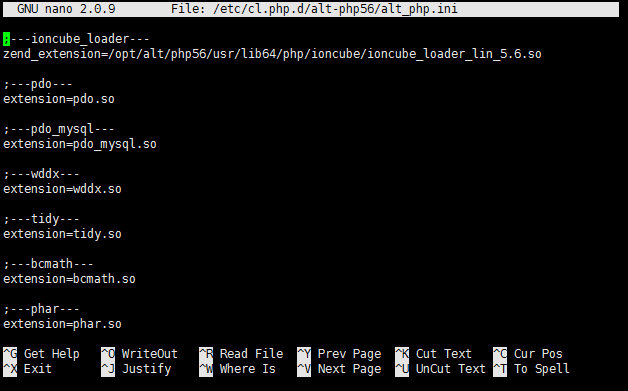
Insert the comand and you'll see the following window:


All changes are to be entered in the end of the file. Press F2 to save changes, then press Y. To end the prosedure press Ctrl+X and close the window.
¿Fue útil la respuesta?

 Imprimir éste Artículo

Leer también

He cambiado los servidores DNS hace una hora, pero todavía no hay cambios.

Debes esperar 12 - 48 horas hasta que los cambios sean efectivoos. No hay manera de acelerarlo.

¿Cómo crear una base de datos?

Para crear una base de datos ve al cPanel - "Bases de datos" - "Bases de datos MySQL". Escribe el...

¿Cómo cambiar el idioma del cPanel?

Ve a «Preferencias» → «Cambio de idioma».

¿Dónde cambiar los permisos de carpetas y archivos?

Los permisos se pueden cambiar en el cPanel - "Administrador de archivos" - selecciona los...

How to Change your Email Password

Login to cPanel and click on the Email Accounts icon located in the MAIL section.   From the...